The offline tools that still work with no connection
Aeroplane mode is a better test of an app than any description. What survives it, what fails at the export step, and the ninety-second check that tells you which is which.
Short answer
An app works offline when the whole task finishes with the radio off, which is narrower than running on your device. File transfer over a local network, storage scans, text rendering, media encoding and system text-to-speech all qualify. Anything that downloads a model, resolves a name or checks a licence at launch does not.
On this page
The train goes into a tunnel, the hotel wifi wants a card number, the flight is four hours. Offline tools are applications that complete their whole job on the device, with the network switched off entirely, and knowing which of yours qualify is the difference between four dead hours and four useful ones.
This is a narrower question than it sounds. Plenty of software runs on your device and still stops without a connection, because the part that does the work lives somewhere else. The test is not where the app is installed. The test is whether the task finishes with aeroplane mode on.
Offline, on-device and no-account are three different things
These get used interchangeably and they describe different properties. Sorting them out is most of the work.
- Offline means the task completes with no network at all.
- On-device means the processing happens locally, which usually implies offline but not always — some on-device features still check a licence or fetch a model first.
- No account means you were not asked to sign in, which says nothing about whether the work is done locally.
An app can be all three, or any one of them. A photo editor with no account that uploads your image to a server is on none of them despite feeling private. A transcription app that downloaded a model once and never phones home again is offline in practice, but only after that first connected run.
| Property | What it protects | What it does not |
|---|---|---|
| Offline | Works in a tunnel or on a plane | Says nothing about privacy on later syncs |
| On-device | Your file never leaves | May still need a first-run download |
| No account | No identity attached | Files may still be uploaded |
| Local network only | Nothing reaches the internet | Requires both devices present |
The useful question before a long journey is not "is this app private" but "does this app finish the job with the radio off".
What genuinely still works with no signal
The offline tools that survive the test cluster into a few categories, and they cluster there because the work is arithmetic on data you already hold.
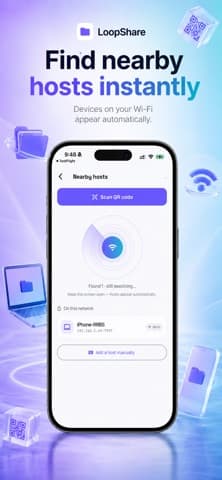
Moving files between two devices in the same room. Peer-to-peer transfer over a local network needs a router or a direct link, not an internet connection. loopStream does this by discovering nearby hosts and joining with a scan, and the transfer never leaves the local network. A hotel wifi that has not been paid for often still passes local traffic, which is exactly the case this covers.
Controlling machines on your own network. Wake-on-LAN is a broadcast frame on the local segment. Wakivo sends it from a phone to a sleeping computer without any internet involvement, because the packet was never going to leave the building. This is covered in more depth in our guides.
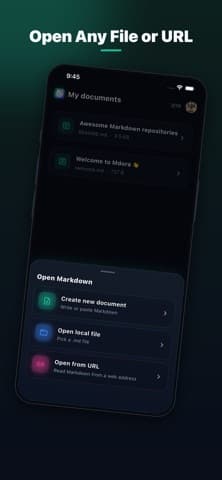
Reading and writing text. A markdown reader like Mdora opens a file from local storage and renders it. There is no server in that operation and there never needed to be.
Reclaiming storage. Working out which files are large and which are duplicates is a filesystem scan. CleanX runs it locally, which is why it works at 30,000 feet.
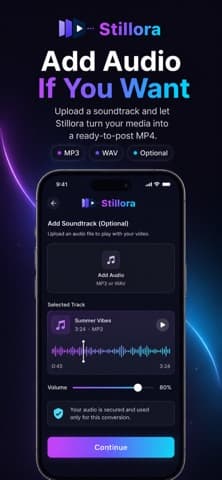
Assembling media you already have. Turning photos and an audio file into an MP4 is encoding, and encoding is arithmetic. Stillora does it on the device, so the output appears without an upload.
Speech from text. System voices are installed on the phone. SpeakFile uses them to read a document aloud, and the voices work without a connection once the voice itself has been downloaded — which is the first-run caveat above, applied to a real case.
What quietly does not, and why
The failures are more predictable than people expect. Three patterns cover almost all of them.
Anything that needs a model it has not downloaded yet will fail on first use and work thereafter. Large speech and translation models are hundreds of megabytes, so they are fetched on demand rather than shipped in the app. Run the feature once on wifi before you need it, and it becomes offline software.
Anything that resolves a name fails immediately. Maps without cached tiles, anything that looks up a link, anything that checks a licence server on launch. That last one is the cruel case: the work is local, the permission to do it is not.
Anything collaborative is not offline in any useful sense. A shared document can queue your edits, but it cannot show you anyone else's, and the merge happens when you reconnect. That is deferred, not offline.
How do you test an app before you rely on it?
Do not trust the store description on this. Test it, once, in ninety seconds.
- Do the task once with a normal connection, so any first-run download completes.
- Turn on aeroplane mode. Leave wifi off as well — this is the step people skip.
- Force-quit the app and reopen it. A lot of software only checks the network at launch.
- Do the whole task, including the save or export at the end.
Step 4 matters most. Plenty of apps let you work happily offline and then fail at export, which is the point at which you have lost the work rather than merely been inconvenienced.
Keep a short list of what passed. Four or five confirmed offline tools that cover transfer, text, media and storage will handle most of what a journey throws at you, and knowing which they are beats installing eleven and hoping.
What to install before you actually need it
The worst time to discover an app needs a download is when you cannot download. A small amount of preparation removes almost all of that risk.
- Fetch the voices, models and map regions for anything you expect to use. These are the single most common first-run dependency.
- Open each app once on wifi after an update. A new version sometimes re-fetches what the old one had cached.
- Copy the files onto the device itself, not into a sync folder placeholder. A file that exists only as a cloud reference is not a file you have.
- Check the export path works, because that is where offline tools fail most often.
Doing this the night before a journey takes about ten minutes and converts a set of maybes into a set of knowns.
Why is this getting easier rather than harder?
Two changes, both recent. Phone hardware now runs work that needed a server five years ago, so the processing that was outsourced for capacity reasons no longer has to be. And the regulatory pressure on data handling has made local processing a feature worth advertising rather than an implementation detail.
The result is that offline tools are no longer only the simple ones. Transcription, background removal and translation now ship as on-device features in ordinary apps, and Apple's own on-device processing documentation describes running models locally as the default path rather than a special case.
The practical effect is that the category of offline tools keeps widening, and the reason to prefer them is no longer only privacy. That said, the direction is not uniform. Anything with a running cost per use — a large language model, a rendering farm — has a commercial reason to stay on a server, and no amount of hardware improvement changes that arithmetic. Expect the split to hold: cheap, bounded work moves to the device, and expensive open-ended work does not.
For the related but separate question of which tools upload your files even when they appear to run locally, see our note on online tools and the practical file tools that avoid it.
Frequently asked questions
- Does aeroplane mode also switch off wifi?
- On most phones it switches off the cellular radio and wifi together, but wifi can be re-enabled while aeroplane mode stays on. For a genuine offline test, confirm both are off, because an app connecting over hotel wifi will look offline-capable when it is not.
- Why does an app work offline once and fail the next time?
- Usually a cached licence or session token that has expired. The work is local but the permission to do it is checked periodically, so the app fails at launch after a fixed interval rather than on first use.
- Is local network transfer the same as offline?
- For practical purposes on a journey, yes — no traffic leaves the building and no internet connection is needed. It is not the same as working alone, because both devices have to be present on the same network at the same time.
- Can I make a cloud app work offline by downloading files first?
- Partly. Most sync clients let you mark files for offline availability, which covers reading and editing. Anything that generates something new on a server, such as a conversion or a summary, still fails until you reconnect.
Sources
- Core ML — on-device model execution — Apple Developer
- Wake-on-LAN and the magic packet — IETF
- Android — background execution limits — Android Developers
Published by
Loopara
Practical guides, free tools, workflows, and resources for productivity, files, images, video, text, creators, and everyday digital tasks.
About the publication